
Dictation, built around the words that need work.
You give Dictéo the words a child has to revise — the ones from the lesson, the ones missed yesterday — and the app writes the dictation that contains them, at the right length and in the right tense.
Dictéo teaches French spelling, for the French primary years CE1 to CM2 (roughly ages 7 to 11). The application interface is in French.
Three steps
Give it the words
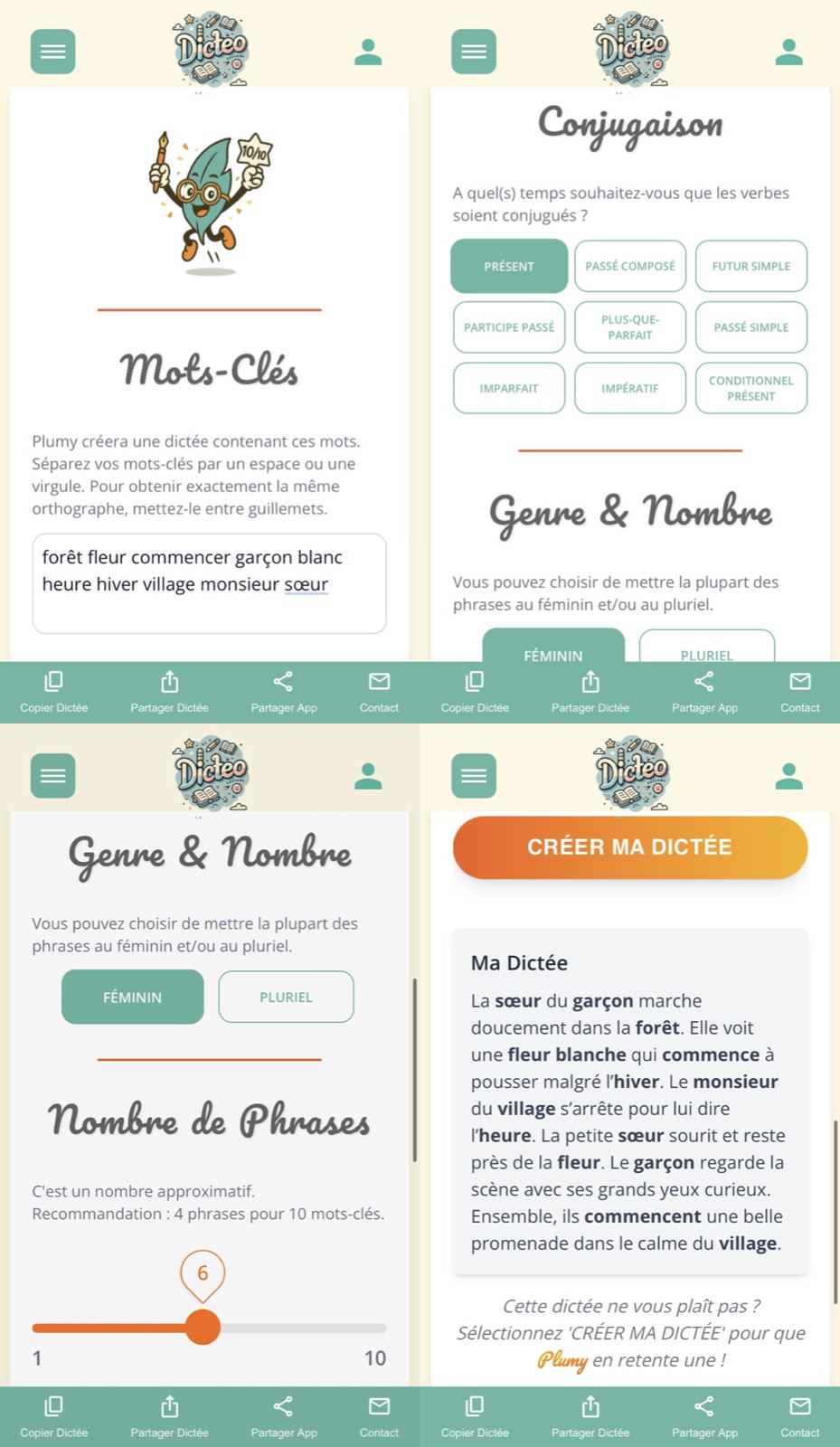
Keywords can be typed, spoken aloud, or photographed — a page of the exercise book will do. The app builds the dictation from them.
Set the difficulty
Number of sentences and verb tense are chosen before generating. Two sentences in the present tense for a seven-year-old, more and in the imperfect for a ten-year-old: same tool, same gesture.
Do the dictation
The text is read to the child, who writes. The resulting dictation can be copied, shared and reused. Each pupil has a profile, so settings follow the person rather than the device.
Why
What it
changes.
The dictation follows the lesson
An off-the-shelf dictation rarely lands on the difficulty of the moment. Here the text is written around the chosen words: the sound covered in class, the rule revised at the weekend, the mistakes from the last piece of work.
Two minutes, not an evening
Photograph the word list and go: there is no text to hunt down, copy out or calibrate. The time saved goes into marking, which is the part that counts.
One account, several children
Each pupil has a profile and their own settings. Siblings at different levels, or a class followed by the same adult, need not be reconfigured every time.
On the family phone
Dictéo is a web app: it adds to the home screen of a phone or tablet and opens like an application, without going through a store.
Who for
Parents,
teachers.
Dictéo is aimed first at families working on spelling at home, and at primary teachers who want to differentiate without multiplying preparation.
Basic use is free. Entering words by voice and by photograph is reserved for subscribers — those are the two functions that cost in processing, and also the two that save the most time day to day.
- CE1 · CE2 · CM1 · CM2
- Web app
- Pupil profiles
- Voice input
- Photo input
- Shareable dictations